

How to make Google like you
Let’s be honest—SEO (Search Engine Optimisation) sounds like something you need a degree in computer wizardry to understand. But fear not! You don’t need to spend months decoding Google’s mysterious algorithm to give your website a love boost. A few small tweaks can make a big difference, and the best part? You can do them yourself following our SEO for the clueless guide!
What is SEO, really?
SEO is like online dating, but instead of impressing a potential partner, you’re trying to court Google. If your website is well-dressed (good design), has an interesting bio (engaging content), and doesn’t ghost visitors with broken links (like showing up for a date only to find the restaurant doesn’t exist), Google will set you up with plenty of matches (aka traffic).
But if your site is a confusing, slow-loading mess with outdated info, Google will swipe left faster than you can say “page 45.”
SEO stands for Search Engine Optimization and is the process of increasing the web traffic to a website (ideally yours!)
SEO already giving you a headache?
Skip the stress and let us handle it! Get in touch today—your website’s future (and Google ranking) will thank you.
Quick fixes that make a difference (level: SEO for the clueless)
You don’t need to overhaul your entire website to see results. Here are three quick SEO for the clueless wins that pack a punch:
1) Titles that make sense
Think of your page titles like book covers. Would you pick up a book called “General Story”? Probably not. Each page needs a clear and compelling title—not just “Home” or “About,” but something that tells people (and Google) what’s inside.
For example: “Expert Home Renovations | Smith & Co. Builders” is much better than just “Welcome“.
2) Meta descriptions that sell and pull people in
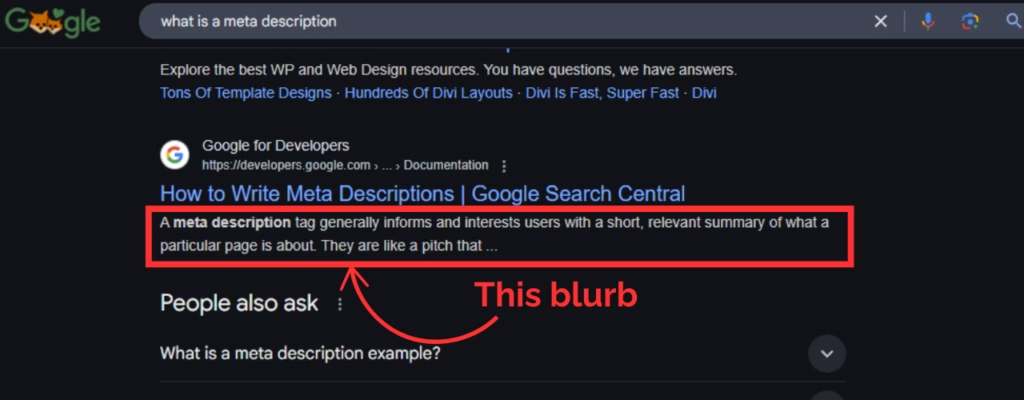
Your meta description is like the trailer for a film—if it’s dull, no one’s watching. A meta description is the little blurb that appears under your website link in search results—so make it count! Instead of “Welcome to my site”, try something that actually tells people why they should click.
For example: “Dreaming of a stylish, functional home? Willow Interiors transforms spaces with expert design and bespoke solutions—bringing your vision to life.” This is much better than just “Welcome to Willow Interiors website“.
3) Keywords without the overkill
Think of keywords like seasoning—just enough makes everything better. But overdo it, and you’ve ruined the dish. Use the words people would actually type into Google to find you, and weave them naturally into your content, headings, and image descriptions. But don’t go shoving them in like a suitcase you’re sitting on to close—Google sees right through that trick.
Keywords are terms/words/questions you try to appear for in search engines like Google. Think what your clients would type to find you and your services.
Example: you are a plumber in Stramith. Your keywords would/could be “plumber”, “plumbing repairs”, “plumber in Stramith”, “leak detection”, “toilet repair”, etc…
The one thing most small businesses forget to do
Set up Google Business Profile (formerly Google My Business). It’s free, and it puts you on the map—literally. When people search for services like yours, having a completed profile increases your chances of showing up in local searches.
Bonus points if you add photos and keep your information up to date.
Simple further “SEO for the clueless” wins you can do in under 10 minutes
- Rename your images – Instead of “IMG_1234.jpg,” use something descriptive like “virtual-assistant-services.jpg.” This helps Google understand what your images are about.
- Check your website’s mobile friendliness – If it’s a nightmare to navigate on a phone, Google won’t be impressed. Test it by pulling up your site on your phone or use PageSpeed Insights—if it’s clunky, it’s time for a fix.
- Add internal links – Link to other pages on your site (like your blog, services, or contact page) to keep visitors engaged longer and help Google connect the dots.
- Fix broken links – No one likes clicking on a dead end. Run a quick check and update any links that don’t work.
- Update old content – Got an old blog or outdated service page? Freshen it up with new info, relevant keywords, and maybe a fresh image. Google loves fresh content.
- Use outbound links wisely – Linking to high-quality, relevant websites (like industry resources or trusted sources) shows Google you’re part of the bigger conversation. Just make sure the links are relevant and add value—no one likes a dodgy date sending them to a sketchy site!
- 💡 Bonus tip – Improve your website speed by compressing large images. A slow site = frustrated visitors = lower rankings.
SEO doesn’t have to be overwhelming or difficult. With a few quick fixes, you can make Google (and your customers) much happier.
And if you’d rather leave the techy bits to someone else? Well, that’s what Clear Coast Solutions is here for. 😉




Leave a Reply